123 Numbers - Count & Tracing
- 4.6
- Rating
- 10.00M
- Installs
- Free
- Price
 Analysis by App-foxy
Learning numbers can be surprisingly demanding for a young child. Recognizing a digit, understanding how many objects it represents, and controlling a finger well enough to trace it are separate skills, even though adults often treat them as one. I spent time with 123 Numbers - Count & Tracing as an educational game from RV AppStudios, paying particular attention to how easily a child can understand what to do, how much help an adult may need to provide, and whether the activities suit different everyday situations.
My overall impression is that this is a focused early-learning tool rather than a broad mathematics course. It concentrates on number recognition, counting, and tracing, with several modes that let a child practise the same basic ideas in slightly different ways. That narrow focus is useful when a child needs repetition without being overwhelmed, although it also means older children or learners looking for addition, subtraction, or open-ended challenges will quickly reach its limits.
The game is free, aimed at Everyone, and has been available since April 11, 2017. Its current version is 2.1.2 and it requires Android 6.0 or later. With a 4.5 average from around 19 thousand ratings and over 10 million installs, it is clearly a familiar choice for families looking for a simple number-learning activity, but popularity alone does not answer the more important question: whether the design works for a particular child.
You May Also Like

 Blood Strike: 2.5 Anniversary
Blood Strike’s Loadouts Turn Every Drop Into a Tactical Gamble
A close look at Blood Strike’s custom loadouts: how fast access to signature weapons reshapes its battle royale rhythm, rewards preparation, and narrows the gap between fights.

 Pandora - Music & Podcasts
Pandora’s Music Is Easy to Start, but Harder to Recover
Pandora’s strength is its low-effort path from a seed to a station. Its weak spot is how much confidence it asks you to place in connection, setup, and quiet recovery.

 8 Ball Pool
 Is Built on Rivalries, Rematches, and Routine
A close look at the rivalries, rematches, shared routines, and unanswered safety questions that turn a quick pool match into a persistent mobile community.

 Samsung Music
’s Quiet Strength Is Playing What You Already Own
Its reach comes less from spectacle than from dependable access to a personal library. That simplicity is both the app’s strongest retention engine and its ceiling.

 AccuWeather: Weather Radar
AccuWeather Review: A Quick, Clear Forecast for Everyday Decisions
For everyday plans, the best forecast is the one you can understand quickly. AccuWeather makes rain timing, radar, and local conditions easy to act on, with a few trade-offs.

 Hill Climb Racing
Why Hill Climb Racing Still Turns Crashes Into One More Run
A tiny car, a bumpy hill and one more upgrade: Hill Climb Racing keeps resurfacing because its simple chaos makes every near-miss feel personal.
More From Our News Desk



How clearly the learning path is presented
I look at the learning path through a practical question: can a child tell what to try next without an adult turning every screen into a lesson? The answer shapes how smoothly counting, recognizing a digit, and tracing can become a short routine. I also pay attention to where a brief spoken prompt helps, since a clear screen can invite exploration without making every activity self-explanatory.
Readability and navigation for young learners
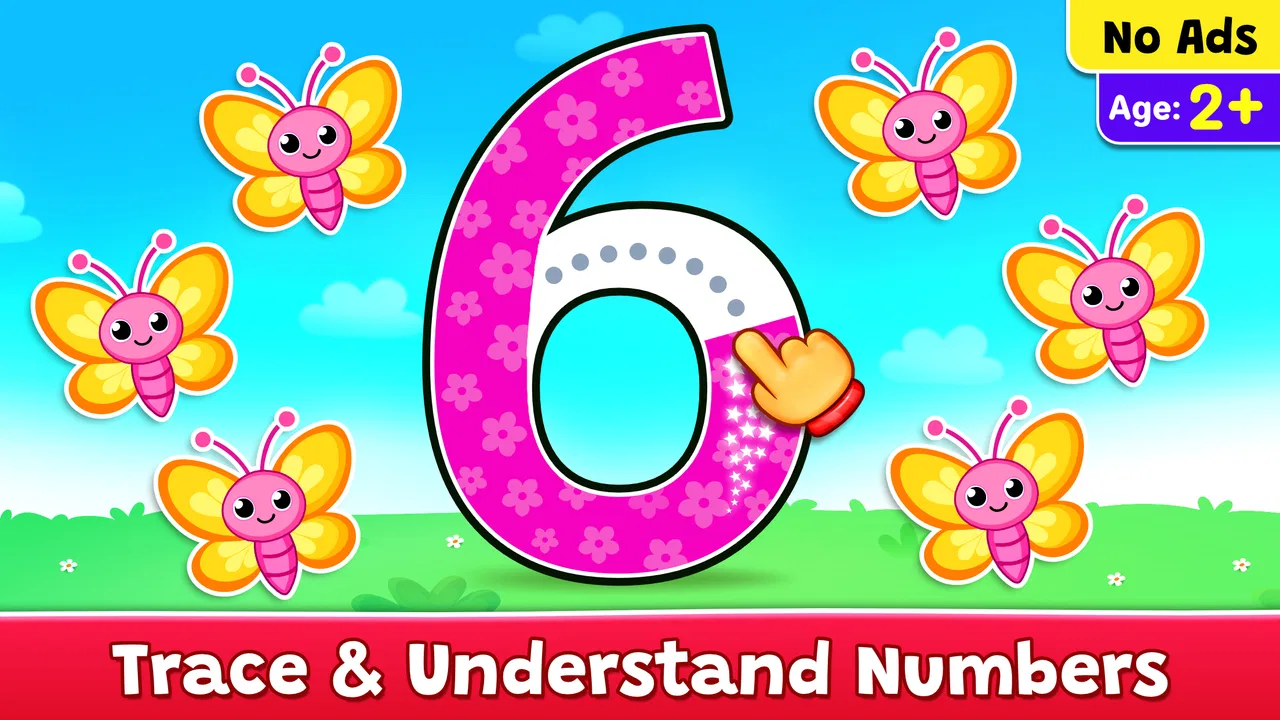
The strongest part of the experience is its directness. A child does not need to understand a complicated menu system before reaching the central activities. The visual approach is built around large, recognizable numbers and simple interactions, which is appropriate for children who are still learning to connect symbols with spoken number names. I found that the game communicates its purpose more clearly than many early-learning apps that fill the screen with unrelated decorations.
That simplicity matters because preschool learners often lose interest when an app asks them to remember several instructions at once. Here, the basic rhythm is easier to grasp: look at a number, count or identify what is shown, then interact with the number through tracing or another learning mode. An adult can demonstrate the first round and then step back instead of having to explain a complete lesson structure.
The large visual targets are especially helpful for children who are not yet comfortable with small touch controls. A child can concentrate on the shape of a digit rather than searching around the screen for a tiny button. This also makes it easier for a parent to point at the relevant area and give a short verbal prompt, such as asking the child to name the number before touching it.
Still, visual simplicity should not be confused with complete independence. A child who cannot yet read may understand the pictures and numbers but still need an adult to explain the goal of a new mode. The app supports early exploration, but it is not a replacement for spoken guidance. I would introduce it during a calm moment, show one example, and avoid expecting a very young child to discover every activity without help.
Using the modes as a small practice routine
The different modes are more valuable when treated as parts of a routine rather than as separate games to rush through. I would begin with counting, ask the child to say the answer aloud, and then move to tracing. This creates a useful connection between quantity, number name, and written symbol. If the child struggles with the tracing step, I would return to recognition and counting instead of turning the session into a test.
One practical approach is to choose a small group of numbers for a short session. For example, a parent can focus on the numbers a child has recently encountered in books or at preschool, then use the app to repeat them in a different setting. The game is particularly suitable for brief practice because its subject is narrow. A child does not need to prepare materials, find cards, or wait for a long activity to load before beginning.
The tracing mode also gives parents something concrete to observe. If a child identifies a number correctly but repeatedly starts in the wrong place or loses the path, the difficulty may be hand control rather than number knowledge. That distinction is important. I would not interpret a missed trace as proof that the child does not understand the digit, and I would avoid correcting every movement so closely that the activity becomes stressful.
The most useful habit is to separate recognition from handwriting practice. Let the child answer verbally first, then treat tracing as a second skill. This keeps the app from becoming a narrow finger-following exercise and gives the adult a clearer picture of what the child actually knows.
Readability for different visual preferences
Numbers are naturally easier to recognize than long written instructions for a beginning learner, and the app benefits from that. A child can often respond to a large symbol and an image-based task before being able to read a sentence. This makes it more approachable for children who are still developing language skills or who become tired when an activity depends on text.
However, visual clarity is personal. Some children respond well to bright colors and animated feedback, while others become distracted by movement or decorative elements. I would watch the child rather than assume that a lively screen is motivating. If the child starts tapping randomly, looking away, or repeating actions without naming the numbers, the session may be too stimulating or simply too long.
For children with emerging language, the app can be paired with an adult’s voice. I would say the number slowly, ask the child to repeat it, and connect it to real objects nearby. Counting three blocks after seeing the digit three is more meaningful than allowing the screen alone to carry the entire lesson. The game provides a prompt; the conversation supplies context.
Motor and sensory considerations
Tracing is the area where children’s abilities can differ most noticeably. It requires a child to place a finger accurately, maintain contact, and follow a path with enough control to reach the end. That is a reasonable early-writing exercise, but it can be demanding for children with developing fine-motor skills, tremors, limited range of motion, or difficulty maintaining pressure on a touchscreen.
I would use a stable surface and hold the device in a way that prevents it from sliding. A child who struggles with one finger may do better with a slower demonstration, a larger physical posture, or an adult guiding the first attempt verbally. The important point is not to force a perfect line. If the goal is number familiarity, a child can still gain value from naming and counting even when tracing is frustrating.
This is also where the difference between a touchscreen game and physical materials becomes clear. A chunky number card, a tray of sand, or a finger-painted digit may give a child more sensory feedback and more room for movement. On the other hand, the app is less messy and easier to use when a family has only a few minutes. I see it as a supplement to hands-on practice, not a full substitute for it.
For children who are sensitive to sound, color changes, or animated responses, an adult should observe the first sessions closely. The game’s appeal comes partly from making practice feel playful, but a child who is easily overloaded may benefit from a quieter environment and shorter turns. I would keep the device away from a busy television, reduce competing noise in the room, and stop when the child shows signs of fatigue.
There is another motor issue that is easy to miss: tapping is not the same as tracing. A child may be able to select a large number but have difficulty following a continuous path. That is not a failure of the whole app. It simply means the activities are testing different abilities. I would use successful taps and spoken answers to build confidence before asking for repeated tracing attempts.
Situational access at home and away
The game fits naturally into everyday transitions. A parent waiting for an appointment, preparing dinner, or sharing a quiet moment before bedtime may want a contained activity that does not require setting up a table full of materials. Because the topic is limited to early number work, it can also be useful when a child needs a short change of pace rather than a long lesson.
A realistic routine would be a five-minute practice period after counting objects during play. A parent could ask a child to count toy cars, open the game to revisit the matching number, and finish by tracing it once. That sequence keeps the digital activity connected to the child’s real environment. I prefer this approach to handing over the device without a purpose, because it gives the child a reason to notice numbers beyond the screen.
It can also work for siblings at different stages, but not equally well for everyone. A younger child may practise identifying and tracing, while an older sibling may act as the caller who names a number or counts objects. This turns the app into a shared activity rather than isolating one child with a device. The trade-off is that an older child may become bored if there is no additional challenge, so I would keep the shared turns short.
Families should also think about device habits. A free educational game can feel harmless, yet repeated screen sessions are not automatically better learning. I would set a clear stopping point and use the app as one item in a wider mix of books, toys, conversation, movement, and paper activities. The game is most effective when it reinforces a concept the child is already meeting elsewhere.
The age rating of Everyone makes it suitable for a broad family audience, but that does not mean every child will find it equally easy. Developmental readiness matters more than the label. A child who is not ready to distinguish symbols may need object-based counting first, while a child already writing numbers may need a more advanced mathematics app.
Remaining barriers and where another option may be better
The main limitation is scope. This is not the right choice for a child who wants word problems, arithmetic operations, geometry, or a structured progression through several mathematical topics. It is also not ideal as the only resource for handwriting development, since tracing a digital path does not provide the same resistance or spatial feedback as pencil, chalk, or tactile materials.
Another barrier is dependence on adult interpretation. The app can show an activity, but a parent or teacher still needs to notice whether a child is guessing, memorizing a pattern, confusing similar digits, or genuinely counting. Without that observation, it is easy to mistake quick tapping for learning. I would ask the child to explain the answer aloud and connect it to physical objects whenever possible.
Children with significant visual, motor, hearing, or attention-related needs may require tools designed around their specific access requirements. I would not assume that large numbers alone make an app accessible. A child may need alternative input methods, stronger contrast, spoken guidance, reduced motion, or a completely non-screen activity. In those situations, a specialist-recommended resource or adaptable physical material may be a better fit.
The app may also be a poor match for families seeking detailed progress tracking or a formal teaching sequence. Its value is in immediate practice and repetition, not in replacing a teacher’s assessment. If a parent needs documented learning goals, individualized exercises, or evidence of progress over time, a classroom program or a more comprehensive learning platform would likely serve that purpose better.
Compared with flashcards, the game offers more active interaction and makes tracing available without extra supplies. Compared with a counting book, it can invite repeated attempts and give a child a more playful response. Compared with hands-on manipulatives, it is quicker and tidier but less tactile. I would choose between these alternatives according to the skill being practised, not according to the assumption that digital is always more engaging.
Who will get the most from it
I think the best audience is a preschool or early-learning child who is beginning to recognize numbers and enjoys short, guided activities. It is especially useful when a parent wants a simple way to revisit counting and number shapes between ordinary play sessions. The focused design can help a child who needs repetition but loses interest in worksheets.
It may also suit families introducing a child to a second language, provided an adult supplies the spoken number names and checks understanding. The visual number symbols give the child something stable to work with, while the parent can adapt the language around the activity. I would still use books and conversation for broader vocabulary, because number recognition alone does not provide a complete language lesson.
I would skip it, or use it only occasionally, for a child who already writes numbers confidently and needs genuine mathematical reasoning. I would also avoid presenting it as a therapy tool or a complete school substitute. Its strengths are modest but clear: recognition, counting practice, and early tracing in a child-friendly format.
Inclusive verdict after regular use
After looking at the game through the lens of different abilities and situations, I see 123 Numbers - Count & Tracing as a friendly starting point with a sensible learning focus. Its large number-centered activities are easier to approach than a crowded educational suite, and its modes can be combined into a short routine that links counting with written symbols.
Its inclusive value depends heavily on flexibility from the adult. Let a child answer verbally when tracing is difficult, shorten the session when sensory attention drops, and move between the screen and real objects. Those small adjustments make the experience more welcoming without pretending that one app can meet every access need.
RV AppStudios has kept the concept approachable, and the free price removes an obvious barrier for families who want to try it. The game is available for Android devices running version 6.0 or later, so compatibility should be checked before planning around it. I would recommend it as a supplementary early-number activity, especially for short practice at home, while keeping physical counting and writing activities in the routine.
My final recommendation is positive but specific: choose it if your child needs playful repetition of numbers, counting, and tracing, and be ready to guide the experience. Do not choose it expecting a full mathematics curriculum, detailed assessment, or a universal accessibility solution. Used within its proper limits, it gives young learners a clear place to practise, and that is exactly where this small educational game works best.
FAQs for 123 Numbers - Count & Tracing
01What age group is 123 Numbers - Count & Tracing suitable for?
123 Numbers - Count & Tracing is designed primarily for young children, typically ranging from ages 2 to 5. The app focuses on early learning concepts such as counting and number recognition, making it ideal for preschoolers who are beginning to explore numbers and develop foundational math skills.
02Does 123 Numbers - Count & Tracing require an internet connection?
No, 123 Numbers - Count & Tracing does not require an internet connection to function. This makes it perfect for use on the go or in areas with limited connectivity. Parents can rest assured that their children can enjoy uninterrupted learning experiences anytime and anywhere.
03Are there any in-app purchases or ads in 123 Numbers - Count & Tracing?
123 Numbers - Count & Tracing is generally free to download, but it may contain in-app purchases or ads, depending on the version. Some features or content may require a purchase to unlock. It's advisable for parents to review the in-app purchasing options to ensure a suitable experience for their children.
04How does 123 Numbers - Count & Tracing support learning?
The app supports learning by providing interactive and engaging activities focused on counting, number tracing, and number recognition. It uses colorful animations and intuitive touch controls to encourage children to practice numbers in a fun and effective way, thereby enhancing their early math skills and hand-eye coordination.
05Is 123 Numbers - Count & Tracing available on both Android and iOS?
Yes, 123 Numbers - Count & Tracing is available on both Android and iOS platforms. This wide availability ensures that it can be easily accessed by users regardless of their device preference, offering flexibility for parents and educators who want to introduce young learners to early math concepts.
Pros
- Engaging animations for kids.
- Simple interface for easy navigation.
- Supports multiple languages.
- Offline access available.
- Interactive number tracing.
Cons
- Limited customization options.
- Ads may interrupt gameplay.
- Requires in-app purchases.
- No advanced math features.
- Limited to basic numbers.

123 Numbers - Count & Tracing
Gallery